Client FAQ
No questions match your search. Try different words.
What is the Albion Data client?
The Albion Data client is a small application you run while playing Albion Online. It monitors network traffic for the game, extracts market and gold price data, and uploads it to the project's servers. That data is then distributed to websites and tools that display or use it.
How do I install and run the client?
Download the latest release from GitHub, extract it, and run the client while Albion Online is running. The client will upload market data from the markets you open in game. No configuration is required for basic use.
Client immediately disappears when loading
Running the client from the command line keeps the window open so you can see error messages.
- Windows: Press Win+R, enter
"C:\Program Files\Albion Data Client\albiondata-client.exe", then view the output. - MacOS: Open Terminal (Cmd+Space, type
terminal), run/path/to/albiondata-client, then view the output. - Linux: Open a terminal, run
/path/to/albiondata-client, then view the output.
Client crashing — device/adapter errors
Errors such as "No such device exists", "Error opening adapter: The system cannot find the device specified. (20)", or "You don't have permission to capture on that device" (Linux/MacOS) mean the client cannot attach to the network interface used by Albion Online.
Fix: Tell the client which adapter to use with the -l (lowercase L) option and your adapter's physical (MAC) address.
- Windows: Open a command prompt → run
ipconfig.exe /all→ find the adapter that gives you connectivity and note its Physical Address. Then start the client with"C:\Program Files\Albion Data Client\albiondata-client.exe" -l "B4-2E-99-31-90-E2"(use your address). - MacOS: Open a terminal → run
ifconfig→ find the adapter and its physical address. Start the client with/path/to/albiondata-client -l "14:7D:DA:DB:C6:29"(use your address). - Linux: Same as MacOS:
ifconfig, find the physical address, then/path/to/albiondata-client -l "7E-13-57-B4-C4-3B"(use your address).
Windows: the Physical Address appears in ipconfig /all output. Example:
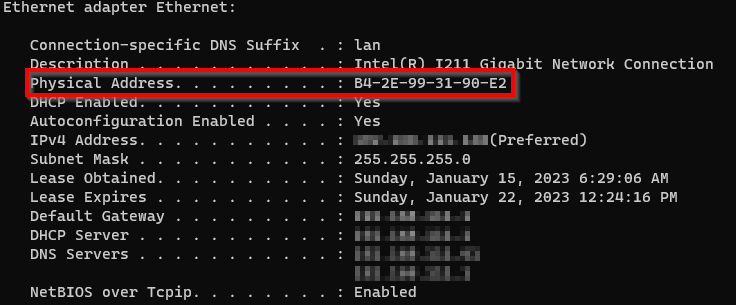
ipconfig /all (Windows)MacOS and Linux: run ifconfig and find the physical (MAC) address for your active adapter. Examples:
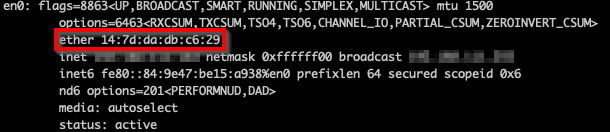
ifconfig (MacOS)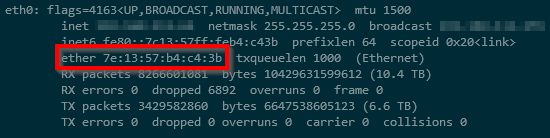
ifconfig (Linux)MacOS / Linux: need sudo
Running the client with sudo is the simplest option. To avoid full sudo, you can use a dedicated capture group (based on this approach). Replace /path/to/albiondata-client with the actual path to your client; aod = "Albion Online Data".
# Add a capture group and add yourself to it
sudo groupadd aod
sudo usermod -a -G aod $USER

# Change the group of the client and set permissions
sudo chgrp aod /path/to/albiondata-client
sudo chmod 750 /path/to/albiondata-client
See also the original developer discussion.
Why don't I see the data I'm uploading?
The client only uploads market orders that you actually load in game. If you need a specific item or city's prices, open that market in Albion Online and browse the orders. Once loaded, the client sends the data and it becomes visible in the feed and on sites that use our data.
Encryption
In January 2024, SBI made changes to market data. All accounts were receiving encrypted data making the AODP client unable to capture live market data. We worked with a community manager at SBI; they (SBI, not the community manager) decided to allow many accounts to receive unencrypted market data again. However, unencrypted data is based on some combination of variables that we are not aware of. We believe it involves multiple data points including the character/toon you are using, your overall account, the game server you're on, playtime, founder status, if you spent IRL money on gold (legally via their site), etc.

If you are getting the highlighted message in the image above, no, there is nothing we (AODP) can do. Please don't send a message in Discord, because you'll get the same answer as you see here. You can reach out to SBI; you may or may not have any luck with a support ticket, but expect no changes.
If "it worked 2 hours ago" and you changed characters/toons or which game server you're on and now "it doesn't work now", that's why.
If you are getting the highlighted message above, market history and gold history are still sent to the AODP server; only live market data is not sent.
Client receives "HTTP Error while proving pow. returned 902"
This means the POW either expired or doesn't exist.
This means your Albion Online Data client is taking too long to send data to our servers. This is slowed down on purpose because we ask your computer to do some math that our server already has the answer to. We needed to add this because bad actors/spammers were sending us bad data and this slowed them down. With that, we wanted to make sure we didn't eat up all CPU cycles on your machine, so we limit it to 25% CPU.
If you wish to bypass this and let your entire CPU be consumed while searching Albion Online markets, you can add the -no-limit parameter when running the Albion Online Data client manually. But… (read next section)
Client receives "403 Forbidden" message
This means you have requested POW and/or sent POW result with data very fast recently. The rate limits can be found here, in the REQUEST_LIMITS section. Note, everything is x2 because to send 1 successful chunk of data, your Albion Online Data client must request a POW then submit the POW result + data. So, for example, per_minute is 270*2, which means you can send 270 chunks of data per minute before being throttled.
How do I disable the client starting with Windows?
- Open Task Scheduler.
- Click Task Scheduler Library in the left pane.
- Find the task named Albion Data Client.
- Right-click it and choose Disable.
Am I allowed to use the client?
Yes. Sandbox Interactive (Albion Online) has stated that analyzing and viewing data in this way is acceptable. You must not modify, manipulate, or interfere with the game or our services. For the full statement, see the forum thread and our Is This Allowed? section on the home page.
Where can I get more help?
The best place to ask questions or report issues is the Albion Online Fansites Discord server, in #proj-albiondata or #developers. Invite link: discord.gg/TjWdq24.